
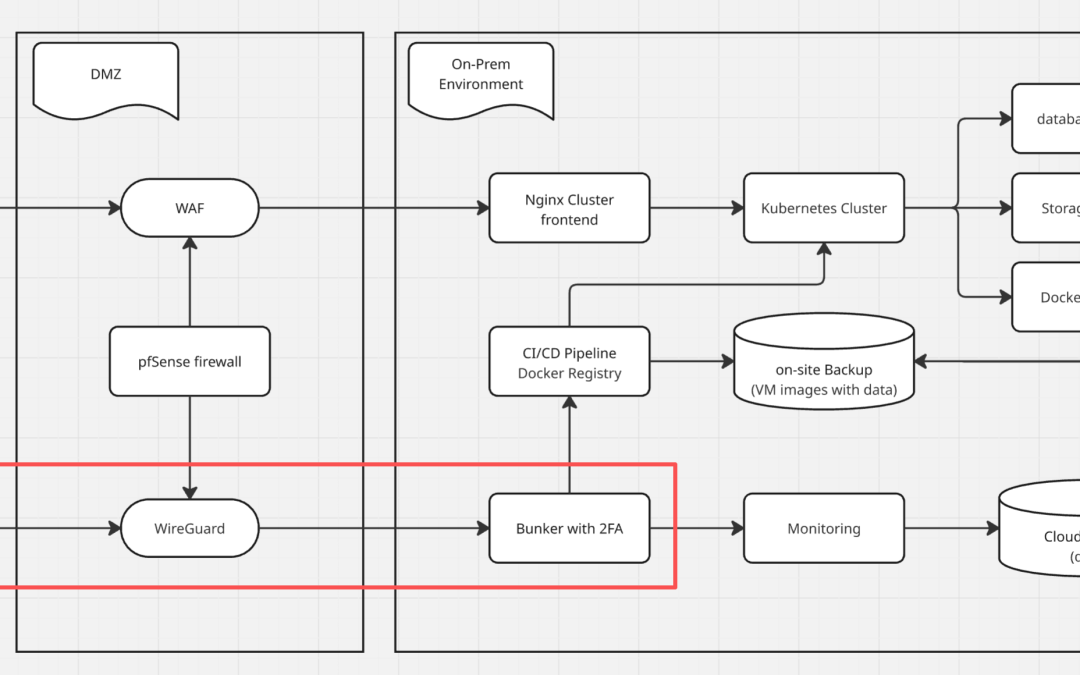
A Simple, Modern, and Highly Secure Solution Using WireGuard and Zero-Trust Principles
In today’s hybrid work environment, employees connect from home, coffee shops, airports, or co-working spaces. At the same time, cybercriminals constantly scan the internet for unprotected services. Many small and medium-sized businesses (SMBs) still leave RDP, SSH, databases, or admin panels open to the public internet because “it’s easier than setting up a VPN.” Unfortunately, this approach often leads to ransomware, data theft, or full network compromise.
This guide shows you a better way: a clean, low-maintenance architecture that gives you enterprise-grade security without enterprise complexity. It combines WireGuard VPN, automatic Perfect Forward Secrecy, network segmentation, and a hardened jump host protected by SSH keys, 2FA, and role-based access.
1. Why a Modern VPN Is No Longer Optional
When employees work remotely, their traffic travels over networks you don’t control. Without a proper VPN, sensitive services become easy targets. Even a single exposed RDP port can be discovered and attacked within minutes.
Many companies still use older VPN solutions (or none at all). These older systems often give users full access to the entire network once connected. If a laptop gets infected or credentials are stolen, attackers can move freely inside your environment.
A modern VPN should solve three problems:
- Encrypt everything end-to-end
- Use strong, up-to-date cryptography
- Limit what each user can actually reach
WireGuard meets all three requirements—and it does so with almost no configuration headaches.
WireGuard vs Older VPNs – Why Perfect Forward Secrecy (PFS) Matters
WireGuard automatically provides Perfect Forward Secrecy. Every time a user connects, the system creates fresh temporary keys. These keys are thrown away after the session ends. Even if someone steals your long-term private key months later, they cannot decrypt past or future traffic.
Most traditional VPNs make PFS optional and easy to misconfigure. WireGuard makes it mandatory and invisible—you get it by default.
Additionally, WireGuard’s code base is tiny (about 4,000 lines vs 400,000+ for OpenVPN/IPsec), which means fewer bugs and a much smaller attack surface.
2. Network Segmentation – Never Give Full Network Access
The biggest mistake with most VPN setups is treating the VPN like an “open door” to the entire office network. Once connected, users (and potentially attackers) can reach every server, share, and database.
A safer approach is strict segmentation:
- Remote users connect via WireGuard
- Their traffic can only reach one machine: the jump host (sometimes called a “bunker” or “bastion”)
- The jump host is the only machine allowed to talk to the rest of your internal network
This simple rule stops lateral movement dead in its tracks. A compromised laptop cannot scan your file servers or domain controllers because it literally cannot see them.
In practice, you configure your firewall (pfSense, OPNsense, Ubiquiti, Mikrotik, etc.) with two rules:
- Allow WireGuard clients → Jump host (only)
- Deny WireGuard clients → Everything else
That’s it. You now follow the core zero-trust idea: never trust, always verify.
3. The Hardened Jump Host – Your Security Checkpoint
The jump host is the only server remote users ever touch directly reach. Because of this, we make it extremely difficult to break into.
Recommended protections:
- Disable password authentication → use SSH keys only
- Enforce two-factor authentication (2FA/MFA) with Google Authenticator, Yubikey, or Duo
- Use role-based access control (RBAC): – Accountants can only reach the accounting server – Developers can only reach the dev servers – Admins get broader access (but still logged and limited)
- Enable full session logging and send logs to a central system (Graylog, ELK, Splunk, or even a simple Syslog server)
- Keep the server fully patched and hardened (minimal services, AppArmor/SELinux if possible)
Workflow for a typical employee:
- Connect to WireGuard (already encrypted and authenticated)
- SSH to the jump host using their private key + 2FA
- From the jump host, connect to the specific internal server they are allowed to reach
Even if an attacker steals a WireGuard config file and a laptop, they still face:
- The user’s SSH private key (usually passphrase-protected)
- The second factor (phone or hardware token)
- Role-based restrictions on the jump host
That’s three independent layers of defense—exactly what zero-trust recommends.
Conclusion – Enterprise Security, SMB Budget
You don’t need expensive commercial solutions or a large IT security team to stay safe. By combining:
- WireGuard (fast, simple, built-in PFS)
- Strict firewall segmentation (one rule does most of the work)
- A properly hardened jump host (SSH keys + 2FA + RBAC)
…you get a remote-access system that is:
- More secure than most large enterprises
- Easy to deploy and maintain
- Practically immune to credential-stuffing and exposed-service attacks
- Fully aligned with zero-trust and least-privilege principles
Implement this once, sleep better at night, and let your team work securely from anywhere.