


Project Overview
This open-source project demonstrates a production-ready PEP + PDP authorization pattern using Cerbos as the external Policy Decision Point, specifically designed for Multi-Tenant SaaS environments.
GitHub link: https://github.com/ChrisXHLeung/jsonRAG
It implements:
- RBAC via user roles from Auth0.
- ABAC via derived roles, resource attributes, and tenant-based conditions in Cerbos policies.
- SaaS Tenant Isolation: Automatic logical and physical isolation between organizations (e.g.,
client1.comandclient2.com).
Protected resources:
- File resources – Individual JSON files with per-file actions (
create,read,update,delete) restricted by Tenant ID. - AI model execution resources – A multi-model RAG workflow gated by the
analyzeaction, ensuring expensive OpenAI calls are only accessible to authorized tenant administrators.

Multi-Tenant Security Architecture
The system ensures that users from different organizations are strictly isolated:
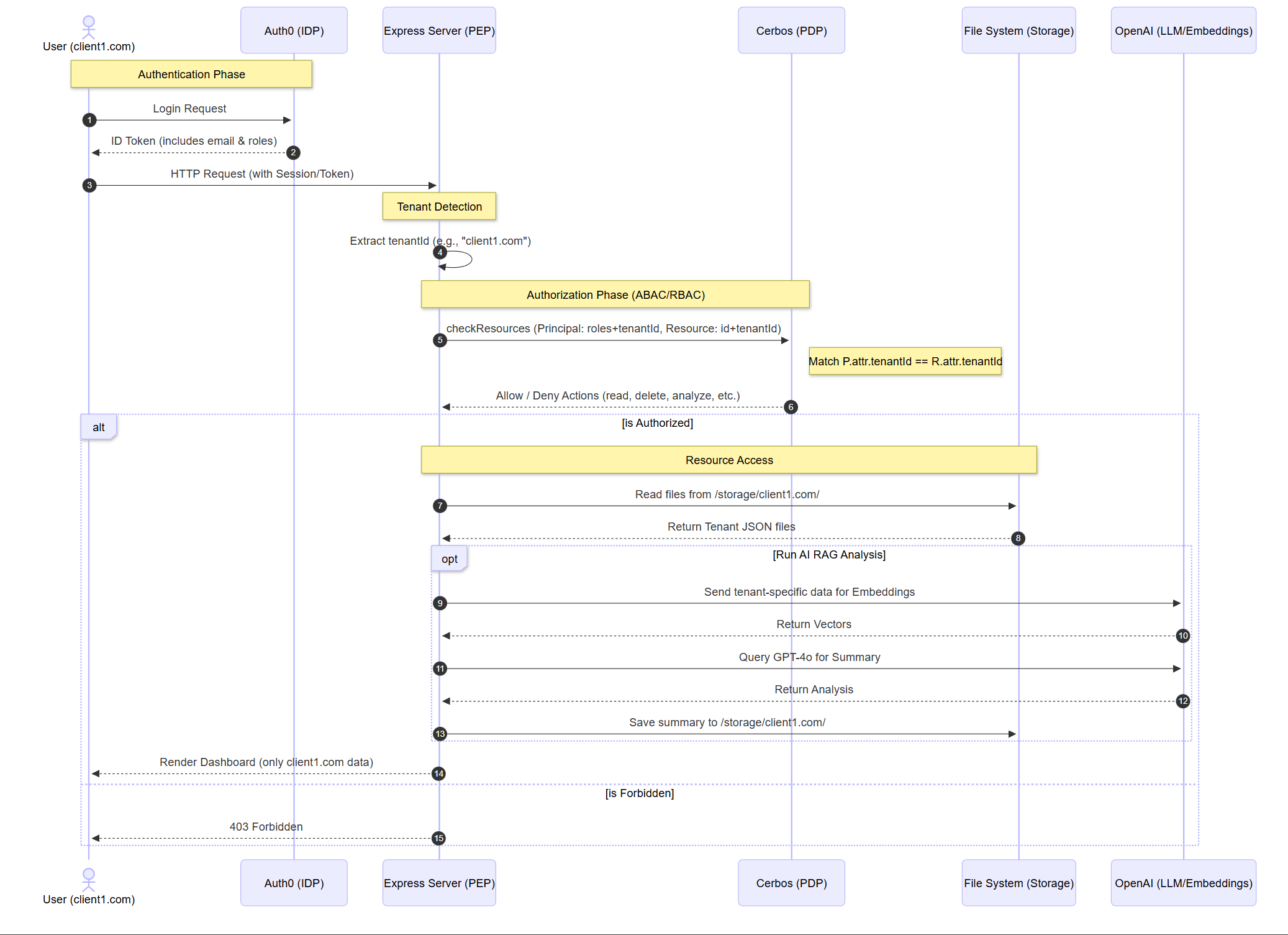
- Logical Isolation (PDP): The PEP extracts the
tenantIdfrom the user’s email domain. Every Cerbos request includes this attribute. The policies use Derived Roles to enforce thatP.attr.tenantId == R.attr.tenantId. - Physical Isolation (SaaS Storage): Files are stored in tenant-specific sub-directories (
/storage/{tenantId}/). A user fromclient1.comcan never access the file system layer ofclient2.com. - Dynamic ABAC Rules: Leveraging Cerbos to implement time-based restrictions and sensitive file filtering without changing application code.
Project Structure
/
├── PEP/                # Main Node.js application (Policy Enforcement Point)
│   ├── index.js        # Express server with Multi-Tenant logic
│   ├── Dockerfile      # Docker image configuration
│   ├── views/          # UI rendering with AuthZ checks
│   ├── storage/        # Physically isolated tenant sub-folders
│   └── ...
├── PDP/                # Cerbos policy repository (Policy Decision Point)
│   ├── policies/
│   │   ├── resource_json_file.yaml      # Multi-tenant resource rules
│   │   └── json_file_derived_roles.yaml # ABAC tenant-matching logic
│   └── ...
└── README.md
Key Features
- Auth0 Multi-Tenant Auth: Identification via email domain.
- SaaS Isolation: Strict logical separation using Cerbos PDP.
- Hybrid RBAC + ABAC: Roles from Auth0 combined with dynamic Cerbos attributes.
- One-click Multi-Model AI Analysis:
- Only processes data belonging to the current user’s tenant.
- Generates timestamped summary reports within the tenant’s secure storage.
Setup & Running
This project is optimized for containerized deployment to ensure consistent environments.
Auth0 Configuration (Required for Roles)
To pass user roles to the application, configure a Post-Login Action in Auth0:
- Go to Actions > Library > Build Custom
- Create a new Action with the following code:
exports.onExecutePostLogin = async (event, api) => {
  const namespace = 'https://your-app.example.com';  // Must match AUTH0_AUDIENCE or a custom namespace
  if (event.authorization?.roles) {
    api.idToken.setCustomClaim(`${namespace}/roles`, event.authorization.roles);
    api.accessToken.setCustomClaim(`${namespace}/roles`, event.authorization.roles);
  }
};- Deploy the Action and add it to the Login flow.
This ensures roles are included in the ID token and accessible to the application.
Environment Variables
Copy .env.example to .env in the PEP directory and fill in values:
# Server
PORT=3000
BASE_URL=http://localhost:3000

# Auth0
AUTH0_DOMAIN=
AUTH0_CLIENT_ID=
AUTH0_CLIENT_SECRET=
AUTH0_AUDIENCE=

# Cerbos
CERBOS_HOST=localhost:3593  # or your Cerbos endpoint

# Session
APP_SECRET=

# OpenAI
OPENAI_API_KEY=

# Models
OPENAI_MODEL_ANALYSIS=
OPENAI_MODEL_SUMMARY=
OPENAI_EMBEDDING_MODEL=
# Example values (uncomment to use):
#OPENAI_MODEL_ANALYSIS=gpt-4o-mini
#OPENAI_MODEL_SUMMARY=gpt-4o
#OPENAI_EMBEDDING_MODEL=text-embedding-3-large

# RAG
RAG_CHUNK_SIZE=
RAG_CHUNK_OVERLAP=
RAG_TOP_K=
# Example values (uncomment to use):
#RAG_CHUNK_SIZE=1024
#RAG_CHUNK_OVERLAP=128
#RAG_TOP_K=5
1. Start Cerbos PDP
Run the Cerbos server to load the multi-tenant policies:
cd PDP
docker run --rm --name cerbos
  -p 3592:3592 -p 3593:3593
  -v $(pwd)/policies:/policies
  ghcr.io/cerbos/cerbos:latest server --config=/policies/conf.yaml
2. Build and Run the App (PEP)
Build the SaaS application image and run it with your environment variables:
# Build the application image
docker build -t json_rag .

# Run the container
docker run -d
  -p 3000:3000
  --env-file=$(pwd)/.env
  --name cerbosRAG
  json_rag
Contributing
Contributions welcome:
- Advanced Cerbos multi-tenant policy templates.
- Support for additional storage backends (S3/Minio).
- Enhanced RAG visualization.
License
MIT License – see LICENSE
A complete reference for PEP/PDP authorization protecting multi-tenant SaaS assets and AI workloads.